Athlete app

Athletes open it and know what to do today.

Gridlines Training was tested by Olympic athletes. It's simple on the surface, with a powerful, adaptive backend that makes every input follow what you prescribed.
Apply to joinGridlines is in early access. Apply, and we'll call you to get set up.
On iPhone and Android, free for every athlete on your plan.Download on the App StoreGet it on Google Play
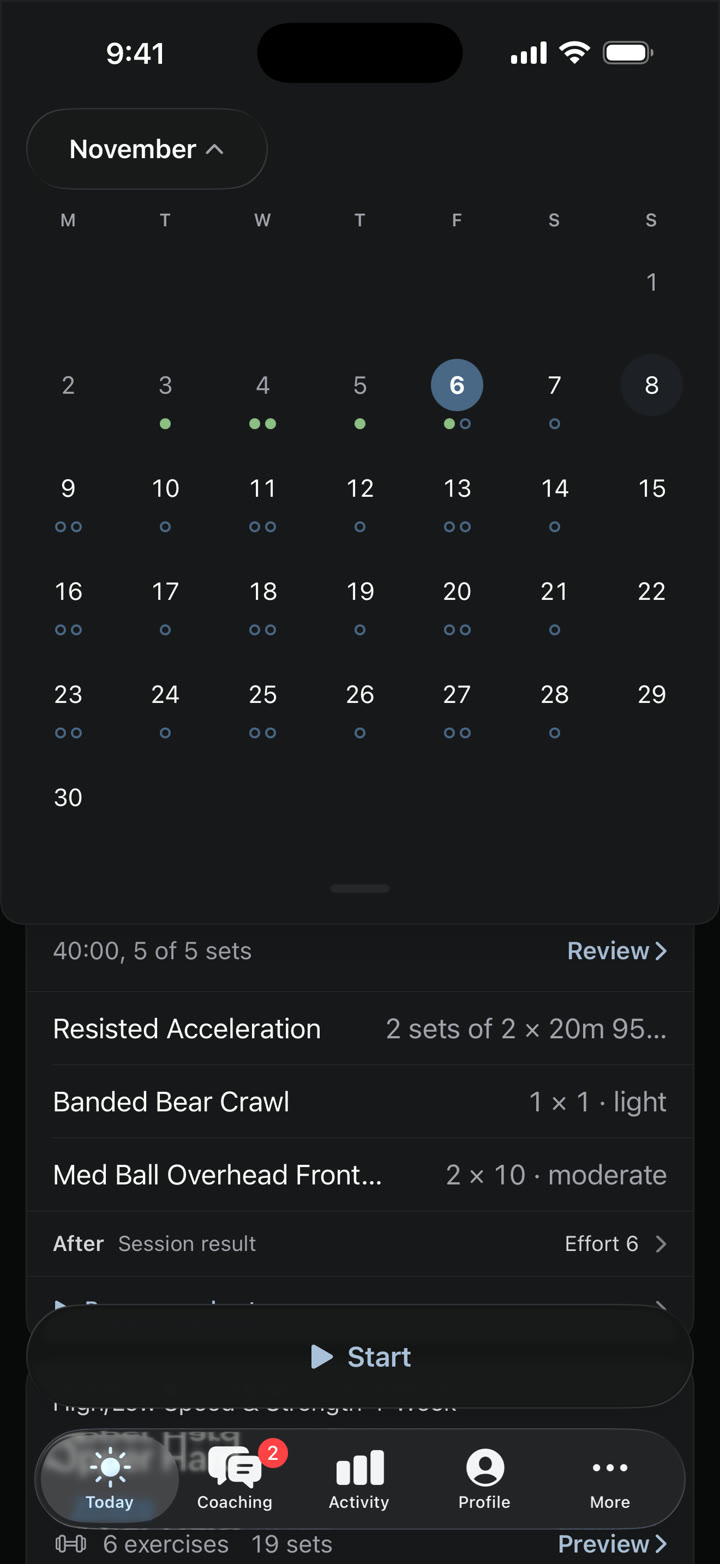
The athlete's November month: this week's logged days in green and planned sessions ringed on most days to the end of the month
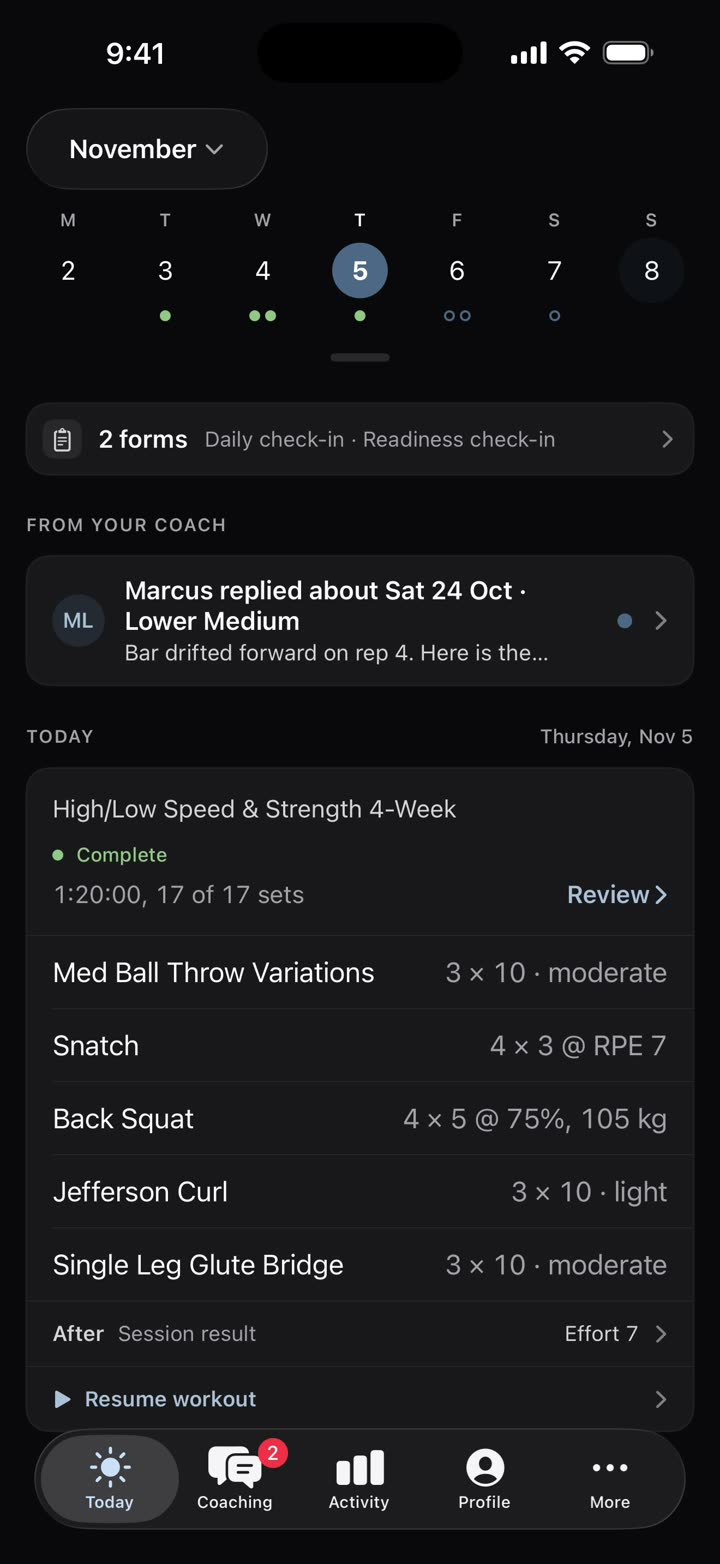
The athlete app's Today: the week strip with logged and planned days, and today's session below

The weight is already worked out

Percentage programs leave athletes doing math between sets. Gridlines works out each load for them automatically, from a percentage or an estimated RPE, and fills it in when they record the set.
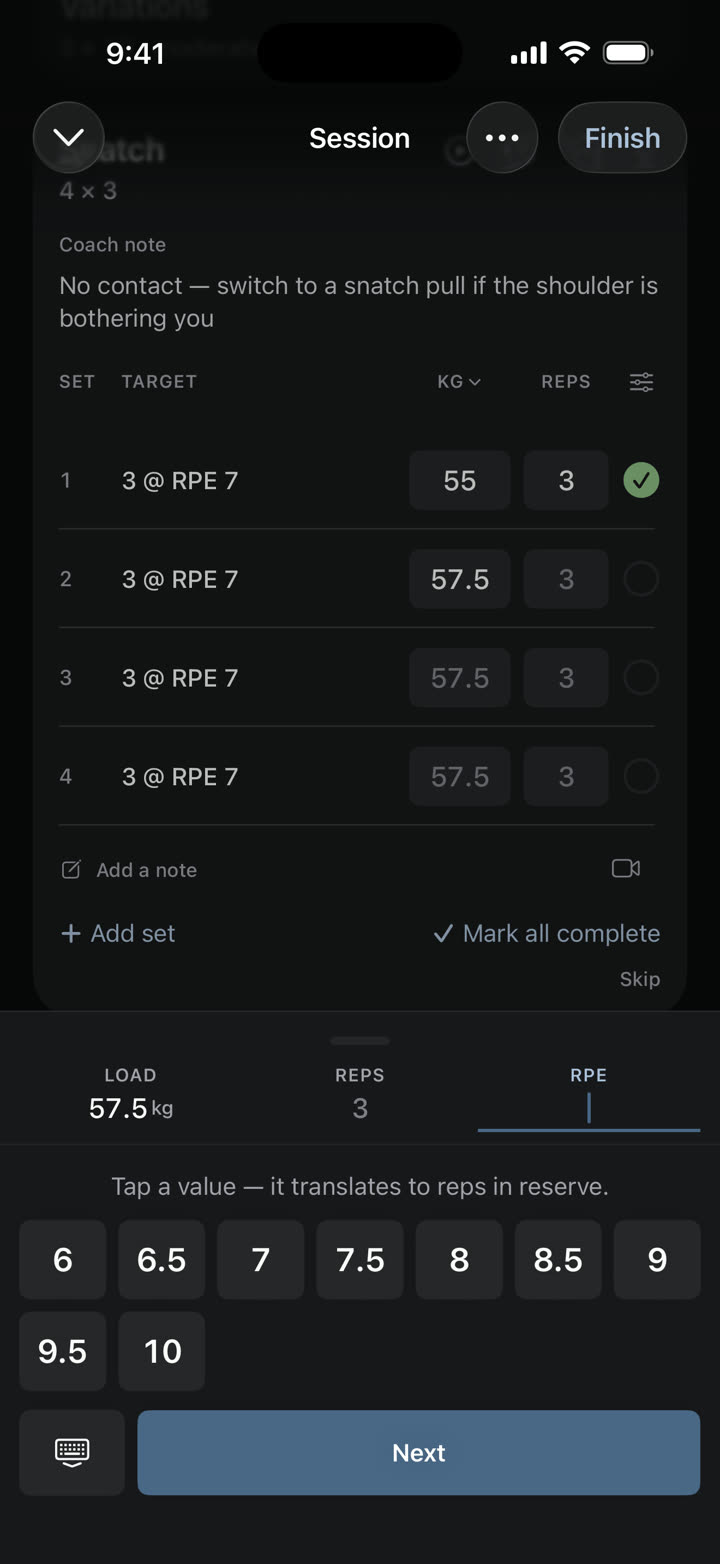
The logger asking for RPE on a snatch, with the RPE pad open

Sprints timed by split

The athlete enters a time for each split and sees the velocity for every one, beside the total for the rep.

A simple calendar of what's coming

Athletes shouldn't have to message you to find out what next week looks like. They scroll ahead through the weeks you've released.

Training that adjusts the way you would

When an athlete wakes up sore, they answer the check-in you built. Your rules either scale the session down the way you normally would or flag you to talk to them.

Clips attached to the exercise

A video sent by text gets separated from the exercise it was for. Athletes attach a clip to the exercise like any other entry, and it reaches your Review with the session it came from.

Features

Also in the app

Apple Watch: display and record from the watch as well.

No signal needed: sets, check-ins, clips and messages wait on the phone and sync when the athlete is back online.

Their own progress: weekly volume, plan compliance and a trend for each exercise.

See your own program in Gridlines.

Send us your program and we'll build it in Gridlines for you. Apply to start.

Apply to joinGridlines is in early access. Apply, and we'll call you to get set up.

In detail · Athlete app

Lifting inputs

Percentage programs leave athletes doing math between sets. The app turns each percentage into a load from the athlete's working max and suggests it as they record. RPE, velocity and force fields appear when you've prescribed them, and the athlete can add another measure if they want to record it.

The load pad open on the back squat, 105 kg for 5 at 75%
The logger asking for RPE on a snatch, with the RPE pad open
  • Loads from the working max, or the 1RM when there's no working max
Read the docs

In detail · Athlete app

Recording

Athletes stop recording when the app makes them fight the fields. If they do the work as written, recording takes a few taps a set, and a small change is almost as quick. The extras are there when they need them.

  • Warm-up, drop, failure and skipped sets
  • Swap an exercise and keep your prescription
  • A rest timer you can nudge by 30 seconds
  • Session effort from 0 to 10, with a note
Read the docs

In detail · Athlete app

Sprint splits

Split a rep into parts, like fly, float and fly, and the athlete enters a time for each one. They see the velocity for every split beside the total for the rep.

One rep recorded as fly, float and fly.
  • Splits set per rep
  • A time for each split
  • Velocity for each split and the rep's total time, shown as they record
Read the docs

In detail · Athlete app

The athlete's calendar

Athletes shouldn't have to message you to find out what next week looks like. They scroll ahead through the weeks you've released and see the events you've marked, which helps them talk it through with you and get ready for it.

The athlete's November month: this week's logged days in green and planned sessions ringed on most days to the end of the month
  • A week strip and a month view
  • Every program they follow, in one calendar
  • Events you've marked
  • Weeks you haven't released yet say so
Read the docs

In detail · Athlete app

Auto-adjust limits

When an athlete wakes up sore, the fix is usually a text before the session. A rule you set can change the session first, the way you would, so that text never has to happen. You won't need it often, but it saves the back and forth when you do.

The coach's Review item for the change: three exercises cut back, each with its old sets
Wednesday's session, trimmed before the athlete starts.
  • Fewer or shorter sets
  • Ease or cap the intensity
  • Swap, add or drop an exercise
  • Skip the session, or move it up to six days later
  • Each percentage cut is capped at 50%, with floors for sets, reps, time and distance
  • Your own step sizes, with loads rounded down to your barbell, dumbbell, machine and kettlebell steps
Read the docs

In detail · Athlete app

Apply on its own, or wait for your OK

A sore athlete waiting on your reply either trains as written or skips. Each rule either changes the session on its own or waits in Review for your OK, and a pain report or a question reaches your phone within a couple of minutes. The athlete sees the session being adjusted, then the new one with your note.

A suggested change waiting in Review.
  • Approve or dismiss suggested changes in Review
  • Undo an applied change from Review
  • The athlete sees today's session being adjusted, then the new numbers and your note
  • Pain reports and questions notify your phone
Read the docs

In detail · Athlete app

Clips

A video sent over text loses track of which lift it was. Athletes attach a clip to the exercise like any other entry, while they train or when they finish, trim it, and it reaches your Review with the session it came from.

  • Record, or pick from the camera roll
  • Trim before sending
  • Attached to the exercise in the session
  • Sent at up to 1080p, keeping the frame rate it was filmed at, up to 60 fps
  • Photos and files go in messages to you
Read the docs

In detail · Athlete app

Offline and other extras

Plenty of gyms have no signal in the basement. Recorded sets, check-in answers, clips and messages wait on the phone and go out when the athlete is back online.

  • Apple Watch: display and record from the watch as well
  • Offline: sets, check-ins, clips and messages queue and sync later, and clips can wait for Wi-Fi
  • A Live Activity during the session, and a widget for today's training
  • Apple Health workouts matched to the session, confirmed by the athlete
Read the docs