Athlete app
Inputs that follow the prescription: RPE, load, VBT
The set rows in the mobile app follow what you wrote. Prescribe a load and your athlete logs a load. Prescribe an RPE and they log the RPE they hit. You read back the same measures you asked for, set by set.
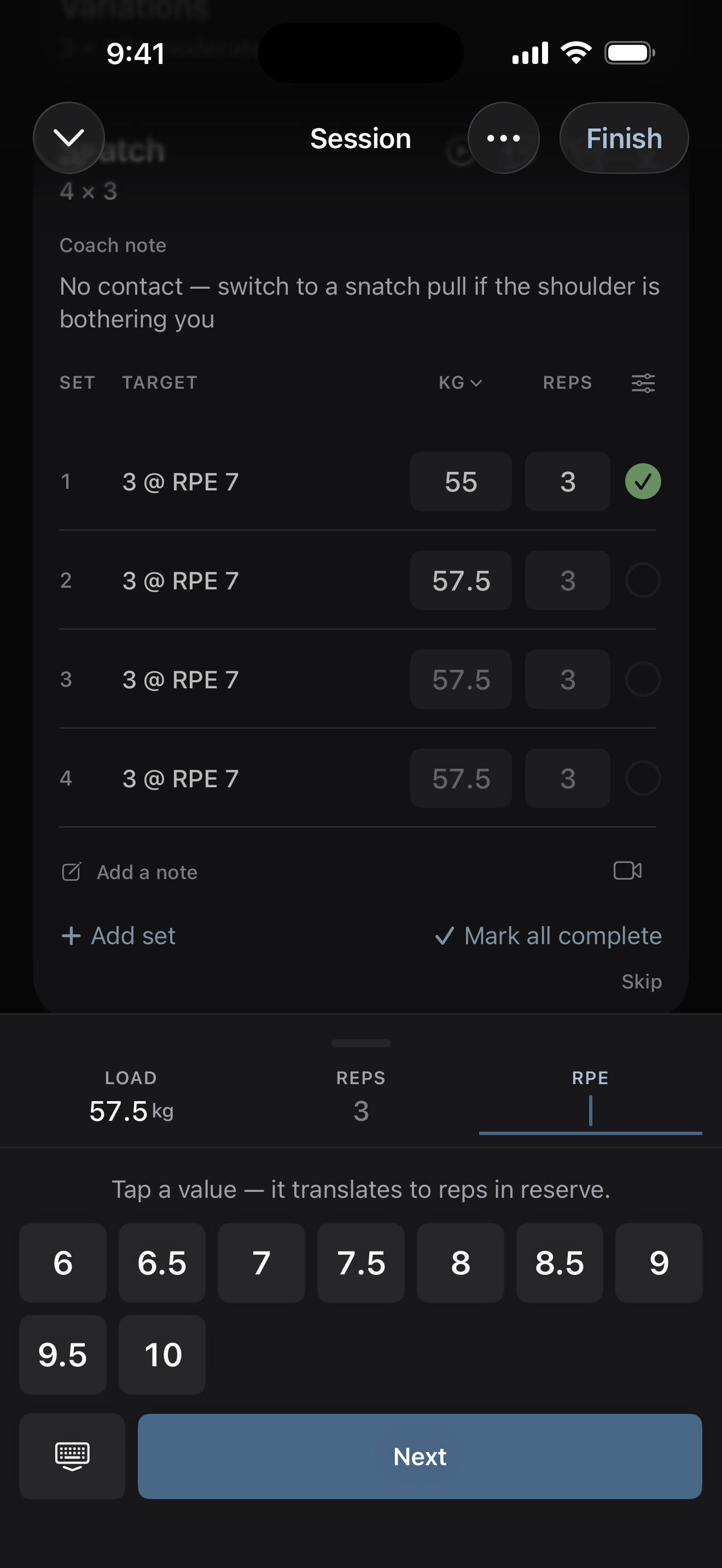 Set rows
What it is
Each set row shows two kinds of field. The first is the fields every exercise of that type gets:
- A lift — weight and reps.
- A sprint — time.
- A jump — height or distance.
- A throw or a distance exercise — distance.
The second is each measure you prescribed. A prescribed height, calories, heart rate, RPE, RIR, or effort percentage adds its own field to the row.
Where to find it
You prescribe these in the program editor. Your athlete logs them in the mobile app, Gridlines Training.
The parts
What you write in the builder
Intensity measures go in the Intensity column:
- A percentage — percent of 1RM, such as
75%. - RPE — 6 through 10, such as
RPE 8. - RIR — reps in reserve, 1 through 5.
- Velocity — a bar speed target, such as
0.75 m/s.
Separate two measures with a semicolon, such as 75%; RPE 8. Cal,
HR, Power, and Force have their own columns. See type sets
and reps quickly.
Load from a percentage
A percentage doesn't add a field of its own. The app turns it into a load from the athlete's saved max and shows that load as the suggestion in the weight field. With no max saved, the athlete sees the percentage as you wrote it, and they can set the max during the session. See set your maxes.
RPE and RIR
When you prescribe RPE or RIR, the athlete logs it on each set. It shows as a small marker under the set number, such as "@8" or "2 RIR". RPE is picked in half steps, and the keypad shows the reps in reserve it stands for. RIR is offered on lifts only.
Velocity, force, and power
When you prescribe velocity, the athlete types their bar speed in m/s for each set. Force and power work the same way, in N and W.
Measures the athlete adds
The athlete can log a measure you didn't prescribe, for one session. The What you log sheet lists the measures in the plan, locked on, and the others under Load and reps, Effort, Time and distance, and Readouts. With Tell my coach on, the change adds a line to the exercise's note. The next session asks for what the plan says again.
Limits
- Velocity, force, and power inputs and the What you log sheet are in testing and not yet in the App Store version of the app.
- RPE runs from 1 to 10, RIR from 0 to 10, and effort from 0 to 200 percent.
- Sprint segments log a time only. The speed on a segment comes from your distance. See sprint segments.
Common questions
Does a percentage need the athlete's max?
Yes. The load comes from the athlete's working max, or their Est 1RM when there is no working max. With neither, the app shows the percentage and never makes up a load.
Can my athlete hide a field I prescribed?
No. A measure in the plan stays on for that exercise.
Related
Stuck? Message us directly.