Review

Give every athlete the level of feedback you want.

An athlete sends a clip on WhatsApp and reports a sore knee on a form, and you only see one of them. Review condenses everything you need to coach into one feed, with the clips athletes send, their messages and the flags from their training, like pain.

Apply to joinGridlines is in early access. Apply, and we'll call you to get set up.

Each row says why it's there.

A list of unread chats doesn't tell you who's hurt and who just said thanks. Scroll Review like a feed. Each row says what it is, whether that's a session to look at, an athlete in pain, a missed check-in or someone who needs programming, and the next step is right there if it needs one.

Give your athletes that in-person feel.

Notes on a lift sent by text are hard to find by the time they train it again. Reply to a clip and your reply is saved with that exercise's feedback, so the athlete sees it the next time they train it. Pin a note to the moment that matters, or record your camera or screen to talk it through and draw on the clip as you go. Each session keeps its own thread that you and the athlete can both come back to.

An athlete's clean in the web clip view, paused at 0:03, with the coach's note pinned to that moment

Answer with a new session.

When an athlete says their knee is sore, changing today's session usually means leaving the conversation to open the program. In Review on the web, open the athlete's calendar from the thread and write the new session right there.

More room on the web.

Some check-ins need more room than a phone gives you. Review on the web has the space for them, and one click takes you to the athlete's programming or into the builder. Keyboard shortcuts are there if you want them.

Hand off the busywork.

Swapping an exercise by hand means opening every day it's programmed. Over three or four weeks that isn't bad, and doing it yourself may be quicker. When you're busy with something else, ask the Agent to swap back squat for box squat over the next four weeks, and it makes the same edits while you work. You can revert most of the edits it makes.

Review from the gym floor.

Most coaches already answer athletes from their phone, in WhatsApp. Coach mode is in the same app your athletes use. If you coach in an organization, switch to it to work through Review from your phone, make quick edits to an athlete's session, and log workouts for in-person clients, even ones who don't have an account, so you keep a record of everything they've done.
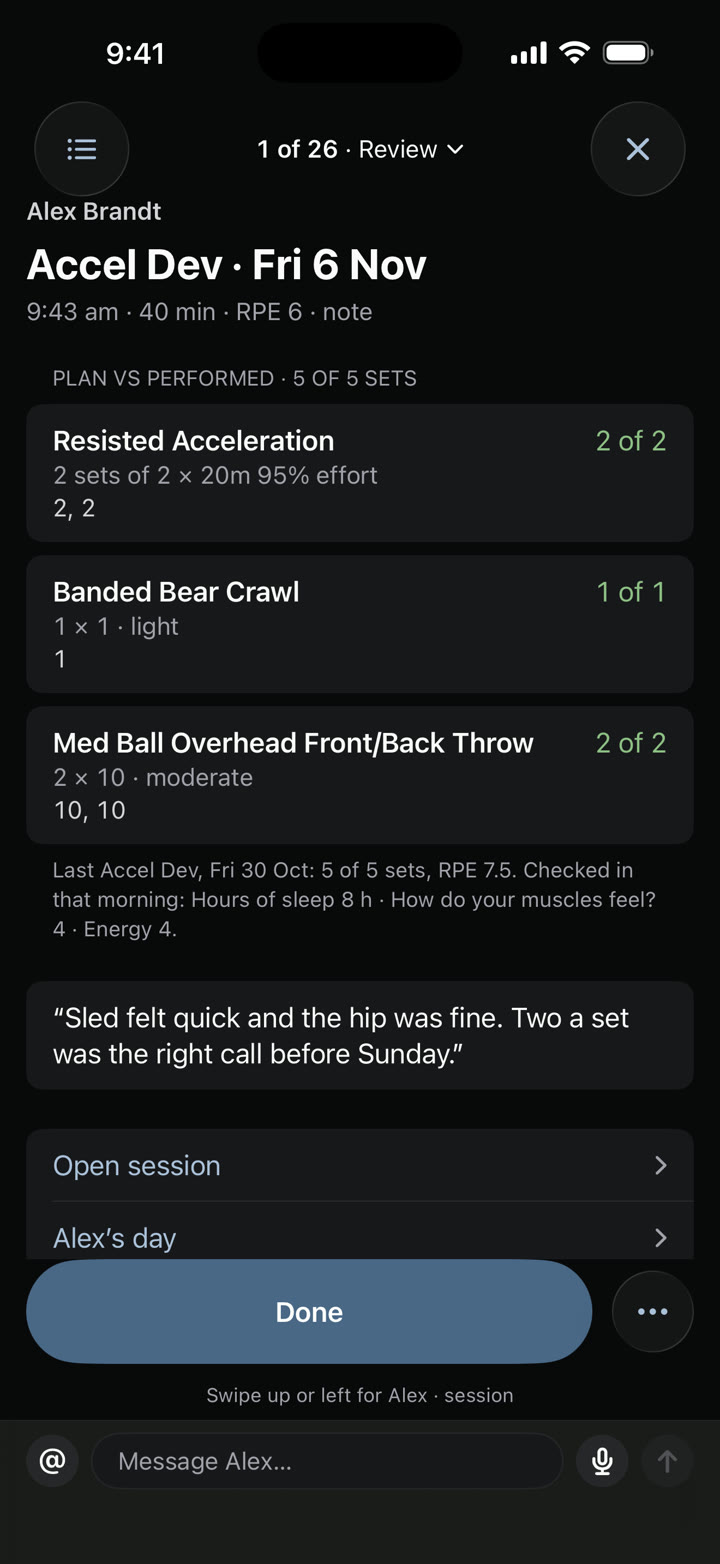
Alex's Accel Dev opened from the coach's Review: plan against what he did, set by set

See your own program in Gridlines.

Send us your program and we'll build it in Gridlines for you. Apply to start.

Apply to joinGridlines is in early access. Apply, and we'll call you to get set up.

In detail · Review

The review feed

When your athletes' updates are spread across a few apps, it's easy to miss the one that needed a reply. Review puts them in one feed. Each row says what it is, and the next step is right there if it needs one.

A morning's feed with a session to look at, an athlete in pain and a missed check-in.
  • Sessions with clips or pain marks
  • Check-in answers that are flagged, below the athlete's 28-day usual, or that ask you to look
  • Missed sessions and missed check-ins, with the last day they logged
  • Messages, videos, photos, voice notes and files
  • Needs programming: calendars about to run out
  • Intake and one-off forms
  • Suggestions from your rules
Read the docs

In detail · Review

Feedback per clip

Notes on a lift sent by text are hard to find by the time they train it again. Reply to a clip and the reply is saved with that exercise's feedback, so the athlete sees it the next time they train it. Record your camera or your screen to talk it through, and draw on the clip as you go.

A reply on the clip, saved to the exercise.
  • Record your camera or your screen
  • Draw lines, circles and angles while you record
  • Staff notes athletes never see, with @mentions
  • Your feedback shows in the athlete's logger next time
Read the docs

In detail · Review

A thread per session

Feedback in a chat app scrolls away under everything else. Each session in Review has its own thread that you and the athlete can both come back to, and the notes you leave on exercises stay attached to it. On the web, pause the clip and pin your reply to that moment.

The coach's note pinned to 0:03 of an athlete's clean, and the athlete's answer below it in the session thread
The same thread on Theo's phone: his clip of the Clean, the coach's note tagged Re: clip 0:03, and his answer
One session's thread, with a reply pinned to 0:03.
  • One thread per session
  • Replies pinned to a moment in the clip, on the web
  • Exercise feedback kept for next time
  • Search Review on the web by athlete, item, message or clip title
Read the docs

In detail · Review

More room on the web

Some check-ins need more room than a phone gives you. Review on the web has the space, with the athlete panel beside the thread, and one click takes you to their programming or into the builder. Keyboard shortcuts are there if you want them.

  • The athlete panel beside the thread
  • Adjust training opens the athlete's calendar over the thread
  • J and K move through the list
  • E marks done, H sets it aside and R opens a reply
  • Z undoes the last one
  • ? lists every shortcut
Read the docs

In detail · Review

Morning email

Opening every athlete's check-in before you've coached anyone eats the start of the day. Each morning, at a time you pick, Gridlines emails you whose check-in answers were flagged and who hasn't checked in yet, so you know what the day needs before you open the app. It only arrives when there's something to report.

  • Each athlete with a flagged answer, and what they answered
  • Who hasn't checked in yet
  • Only the athletes you coach
  • Sent each morning at a time you pick
  • Turn it off in Preferences
Read the docs

In detail · Review

AI proposals

Swapping an exercise by hand means opening every day it's programmed. Over three or four weeks that isn't bad, and doing it yourself may well be quicker. When you're busy with something else, ask the Agent to swap back squat for box squat over the next four weeks, and it makes the edits day by day while you work.

  • Each change is a card you Run or Deny
  • Rule suggestions wait in Review for your approval
  • Revert one change or all of them
Read the docs

In detail · Also in Gridlines

Agent

Pulling together how an athlete's week went means opening the log, the check-ins and the messages one at a time. Ask the Agent for a summary, or have it draft a small change. It makes the same edits you'd make by hand, more slowly, so it suits the moments you're busy with something else.

  • Ask mode answers questions and changes nothing
  • Agent mode shows each change as a card you Run or Deny
  • It always asks before deleting, messaging or shifting dates
  • Revert one change or all of them
  • Ask Agent from any athlete, team or program page
  • Remember saves a rule to your coaching eye
Read the docs

In detail · Review

Review on your phone

Most coaches already answer athletes from their phone, in WhatsApp. Coach mode is in the same app your athletes use. If you coach in an organization, switch to it to work through Review, make quick edits to an athlete's session, and log workouts for in-person clients, even ones without an account.

The coach's Review on the web, grouped into Urgent, Needs a look and Routine
A Review item on the coach's phone: fewer sets for one athlete, with each change and what it was
  • Switch between athlete and coach in one app
  • Most of Review from your phone
  • Quick edits to an athlete's session
  • Log for in-person clients who don't have an account
Read the docs