A premier experience for programming your clients.

Most coaches write the program in a spreadsheet and give feedback over WhatsApp. Gridlines keeps the program, every completed session and your feedback together.

Open a second athlete or team beside the first
Apply to joinGridlines is in early access. Apply, and we'll call you to get set up.
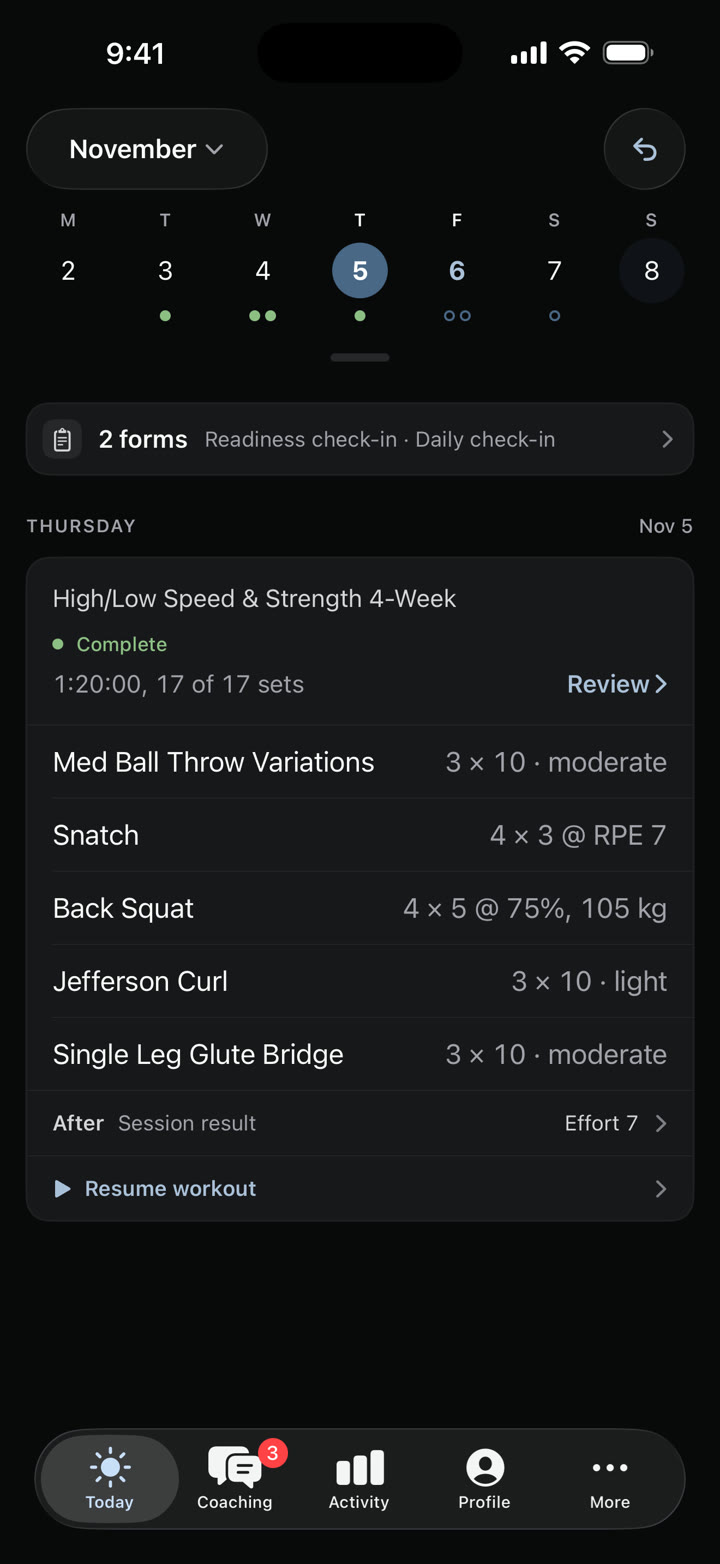
Alex's Thursday on his phone: Lower Light complete, 17 of 17 sets

FIG 0.1

Excel, but it knows training

Once it goes out, you're chasing clients for their data. You still write in a sheet, and the sessions your athletes record and your feedback stay with it.

FIG 0.2

Plan around your dates

Most plans start on a scratch pad with the key dates circled. Here the plan is always in front of you while you work around your key events.

FIG 0.3

Coaching inside the workout

In most apps the coaching happens somewhere else. Here an athlete can open your note on their power clean in the middle of today's session.

FIG 0.4

Review with the context

Feedback sent by text gets lost, and replying means digging for the workout, the pain report and the history. Review puts them beside each item.

Builder

Write in a sheet that knows exactly what you mean.

In a spreadsheet, RPE 8 is a note the athlete has to read. In Gridlines it's part of the prescription, and the athlete records against it.

More on the builder

Plan

Plan the season around the competitions that matter.

At the start of the offseason you usually know the dates that count. In Gridlines you plan around the athlete's schedule, then write the weeks.

More on planning

Athlete app

An athlete app tested by Olympic-level athletes.

Training is more than just lifting. Sprinting, jumping and throwing all get the same attention in Gridlines Training, and sprints are recorded down to each split. On iPhone and Android as Gridlines Training, free for every athlete on your plan.Download on the App StoreGet it on Google Play

More on the athlete app
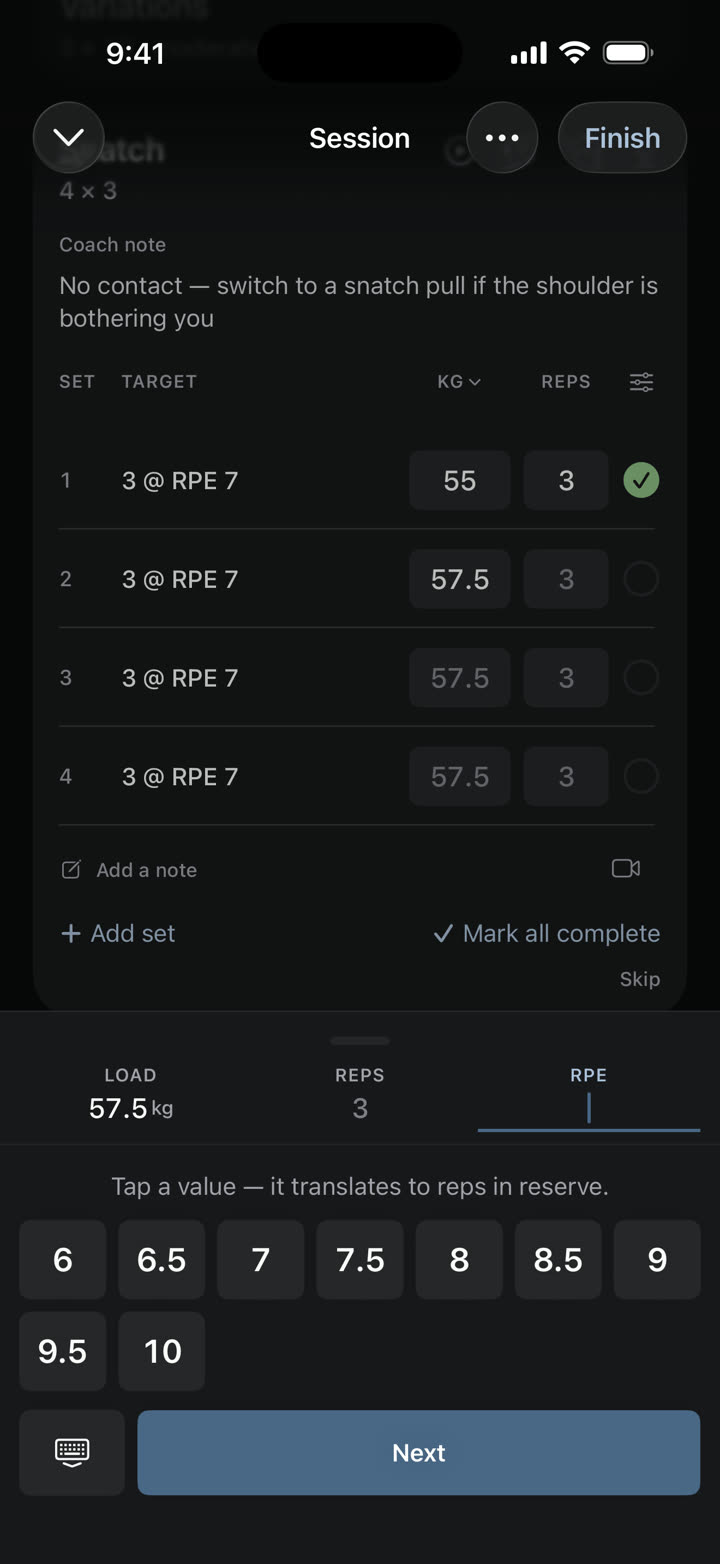
The logger asking for RPE on a snatch, with the RPE pad open

Review

Answer everyone who needs you in one scroll.

Athletes send clips and questions from whatever app they have open. Review brings them, with sessions and flagged check-ins, into one feed.

More on Review

Workflows

A check-in loop that runs inside the app.

Check-ins sent by text get skipped or buried. In Gridlines athletes answer in the app before they train, and a pain report reaches your phone.

More on check-ins and rules

Most coaches run their week across Sheets, WhatsApp, iMessage and Loom. In Gridlines, the change you decide on in a review is one edit away.

Time back Jumping between apps can cost a coach a whole day.

Clients who stay When a reply takes seconds, you can keep up, and that attention is what clients pay you for. The app they open carries your logo and brand color.

One place Messages, clips and check-in answers land in Review instead of WhatsApp and iMessage.

Answer your athletes between sessions.

Switch to coach mode in the same app your athletes use, then work through clips, check-ins and messages in Review and reply in a line.
Review on your phone

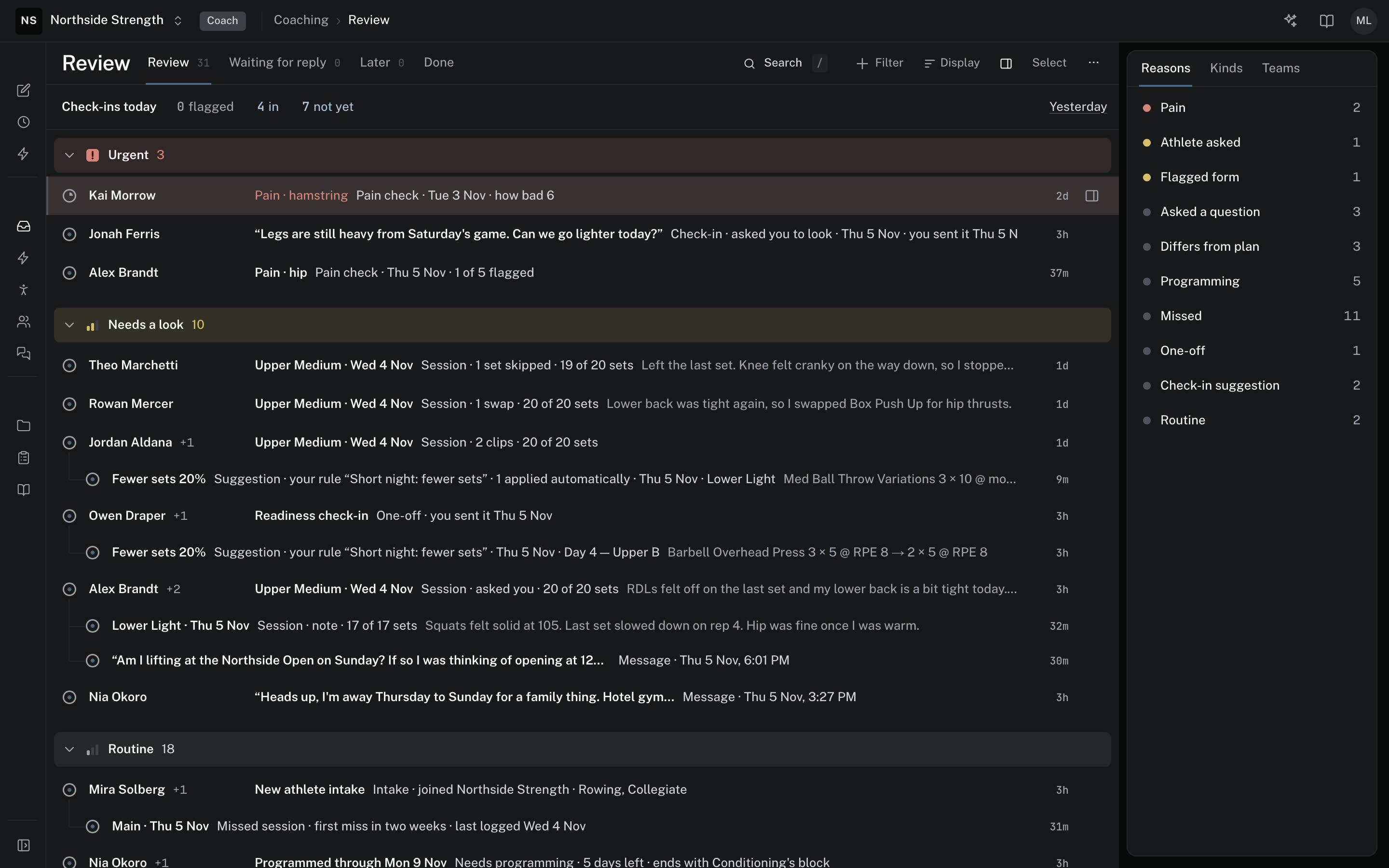
The coach's Review on the web, grouped into Urgent, Needs a look and Routine
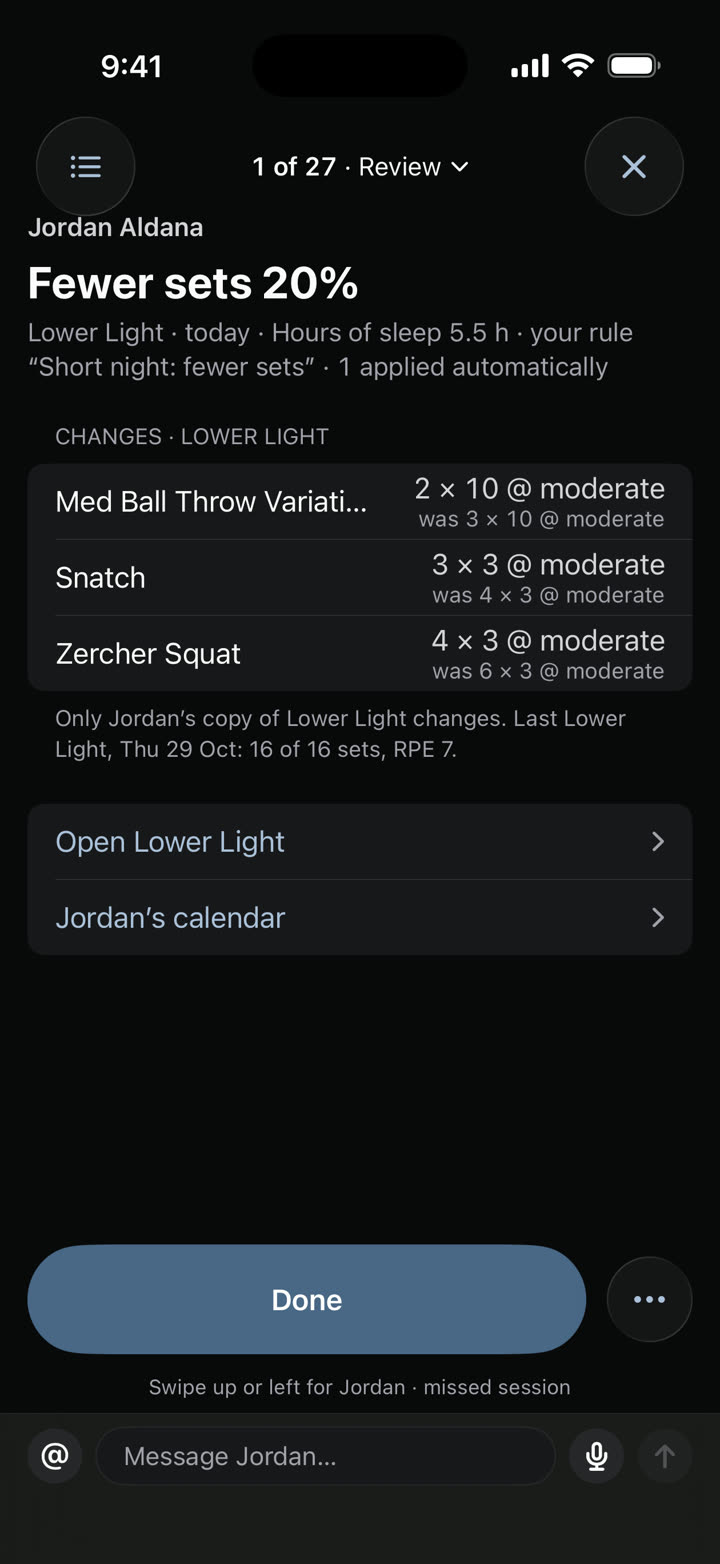
A Review item on the coach's phone: fewer sets for one athlete, with each change and what it was

Also in Gridlines

You write the programs. The Agent is great for busywork, like swapping back squat for box squat for the next few weeks after a low-back tweak.

Switch without starting over.

Your programs, moved for you. Send us your exercise list and workouts. We build them and set up your clients' accounts.

A direct line to the founder. Every coach can email the people who build Gridlines.

Better every week. Ask for something early in the week and it's often fixed by the end of it.

Founded by Kyle Wilcox, an Olympic bobsledder and former Penn football player.

Tell us how many coaches and athletes you have, and we'll quote a plan that includes setup, your branding and a direct line to us.

Updates

New features and fixes you can use, explained for coaches.

See your own program in Gridlines.

Send us your program and we'll build it in Gridlines for you. Apply to start.

Apply to joinGridlines is in early access. Apply, and we'll call you to get set up.

In detail · Builder

Smart copy

In Sheets, copying a week means fixing the formatting afterward, and a value pasted into the wrong column turns into text that means nothing. Here the sheet knows what each column holds. Copy an exercise, a group, a session, a day or a whole week, and every prescription comes across intact.

  • Copy and paste exercises, groups, sessions, days or weeks
  • Copy to next week never overwrites what's there
  • A value that doesn't fit a column is skipped
  • Undo reverses the whole paste
Read the docs

In detail · Builder

Program overview

Showing the shape of a program in Excel means building a chart by hand. The overview lays out the athlete's calendar with its dates, events and the block each workout belongs to. Zoom in to one week or two, or out to the whole program.

  • Zoom to 1 week, 2 weeks or all
  • Dates, events and block bands
  • Edits happen in the sheet, and the overview shows the shape
Read the docs

In detail · Builder

Schemes

Coaches write sets, then reps, then usually a percentage or a load. In a spreadsheet that line is text the athlete has to read. Type it the same way here, like 3x5 @ 75%, 4x8-10 or 4 x 30m, and the builder fills in the sets, reps, loads and distances.

  • Percentages, RPE and RIR
  • Rep ranges like 4x8-10
  • Back-off sets measured from the set above, like drop 10%
  • Distances and times, like 4 x 30m
Read the docs

In detail · Builder

Columns by discipline

In Sheets a sprint and a lift share the same columns, and the athlete gets whatever you typed. Here the sheet shows the columns the exercises on screen need, like distance and time for a sprint or height for a jump. You write it the way you did in Sheets, and each line reaches the athlete with the inputs that fit it.

  • Sets, reps, load, intensity, distance, time, rest, height and notes
  • Calories, heart rate, power and force when you need them
  • Columns follow the exercise types on screen
Read the docs

In detail · Builder

Athlete panel and library

Programming next week usually means opening another tab to see how last week went. In the web builder the athlete panel sits beside the calendar, with recent sessions, loads, how hard each one felt, their notes and any pain they've reported. If a client flags a sore wrist, you can swap out hip cleans without leaving the sheet.

  • Panel: calendar, recent sessions with RPE, notes, feedback, pain and injuries, and profile
  • Open a movement for its sets, RPE, notes and monthly top set
  • Two athletes side by side, copying days across
  • Exercise videos up to 100 MB, or a YouTube or Vimeo link
  • Glossary
  • Tags, and #tag rows the athlete picks from
  • Protocols, like your warm-up, inserted in one go
Read the docs

In detail · Builder

Import

Switching usually means rebuilding your exercise library and programs by hand. During setup we import your exercises and the workouts you want to keep. If something gets missed, import exercises from a file yourself, or follow our guide to connect an AI assistant and bring the rest over.

  • CSV, TSV or Excel, with Ready, Skipped or Error on every row before anything is added
  • Attach an old program to the Agent as a spreadsheet, PDF or photo, and it drafts it in Gridlines for you to check
  • Setup import done by us
  • A guide for connecting Claude or ChatGPT
Read the docs

In detail · Builder

Templates, calendars and phases

A season plan kept on a scratch pad never quite makes it into the workouts. Lay out phases, blocks and events like competitions and travel on the calendar with your dates in mind, then write the weeks inside them. Drag a block to move or stretch it by the week, and each block shows which of its qualities the planned days hit.

Phases and blocks laid out around a competition.
  • A template is placed as a copy
  • A calendar is dated, and everyone following it gets your edits
  • Follow a calendar or place a template
  • One athlete's changes keep the original, shown on the marker as Was:
  • Events on the calendar
  • Move a session by dragging it
  • Save weeks as a template from the athlete or team page
Read the docs

In detail · Athlete app

Lifting inputs

Percentage programs leave athletes doing math between sets. The app turns each percentage into a load from the athlete's working max and suggests it as they record. RPE, velocity and force fields appear when you've prescribed them, and the athlete can add another measure if they want to record it.

The load pad open on the back squat, 105 kg for 5 at 75%
The logger asking for RPE on a snatch, with the RPE pad open
  • Loads from the working max, or the 1RM when there's no working max
Read the docs

In detail · Athlete app

Clips

A video sent over text loses track of which lift it was. Athletes attach a clip to the exercise like any other entry, while they train or when they finish, trim it, and it reaches your Review with the session it came from.

  • Record, or pick from the camera roll
  • Trim before sending
  • Attached to the exercise in the session
  • Sent at up to 1080p, keeping the frame rate it was filmed at, up to 60 fps
  • Photos and files go in messages to you
Read the docs

In detail · Athlete app

Sprint splits

Split a rep into parts, like fly, float and fly, and the athlete enters a time for each one. They see the velocity for every split beside the total for the rep.

One rep recorded as fly, float and fly.
  • Splits set per rep
  • A time for each split
  • Velocity for each split and the rep's total time, shown as they record
Read the docs

In detail · Athlete app

The athlete's calendar

Athletes shouldn't have to message you to find out what next week looks like. They scroll ahead through the weeks you've released and see the events you've marked, which helps them talk it through with you and get ready for it.

The athlete's November month: this week's logged days in green and planned sessions ringed on most days to the end of the month
  • A week strip and a month view
  • Every program they follow, in one calendar
  • Events you've marked
  • Weeks you haven't released yet say so
Read the docs

In detail · Athlete app

Recording

Athletes stop recording when the app makes them fight the fields. If they do the work as written, recording takes a few taps a set, and a small change is almost as quick. The extras are there when they need them.

  • Warm-up, drop, failure and skipped sets
  • Swap an exercise and keep your prescription
  • A rest timer you can nudge by 30 seconds
  • Session effort from 0 to 10, with a note
Read the docs

In detail · Athlete app

Auto-adjust limits

When an athlete wakes up sore, the fix is usually a text before the session. A rule you set can change the session first, the way you would, so that text never has to happen. You won't need it often, but it saves the back and forth when you do.

The coach's Review item for the change: three exercises cut back, each with its old sets
Wednesday's session, trimmed before the athlete starts.
  • Fewer or shorter sets
  • Ease or cap the intensity
  • Swap, add or drop an exercise
  • Skip the session, or move it up to six days later
  • Each percentage cut is capped at 50%, with floors for sets, reps, time and distance
  • Your own step sizes, with loads rounded down to your barbell, dumbbell, machine and kettlebell steps
Read the docs

In detail · Athlete app

Apply on its own, or wait for your OK

A sore athlete waiting on your reply either trains as written or skips. Each rule either changes the session on its own or waits in Review for your OK, and a pain report or a question reaches your phone within a couple of minutes. The athlete sees the session being adjusted, then the new one with your note.

A suggested change waiting in Review.
  • Approve or dismiss suggested changes in Review
  • Undo an applied change from Review
  • The athlete sees today's session being adjusted, then the new numbers and your note
  • Pain reports and questions notify your phone
Read the docs

In detail · Review

The review feed

When your athletes' updates are spread across a few apps, it's easy to miss the one that needed a reply. Review puts them in one feed. Each row says what it is, and the next step is right there if it needs one.

A morning's feed with a session to look at, an athlete in pain and a missed check-in.
  • Sessions with clips or pain marks
  • Check-in answers that are flagged, below the athlete's 28-day usual, or that ask you to look
  • Missed sessions and missed check-ins, with the last day they recorded
  • Messages, videos, photos, voice notes and files
  • Needs programming: calendars about to run out
  • Intake and one-off forms
  • Suggestions from your rules
Read the docs

In detail · Review

AI proposals

Swapping an exercise by hand means opening every day it's programmed. Over three or four weeks that isn't bad, and doing it yourself may well be quicker. When you're busy with something else, ask the Agent to swap back squat for box squat over the next four weeks, and it makes the edits day by day while you work.

  • Each change is a card you Run or Deny
  • Rule suggestions wait in Review for your approval
  • Revert one change or all of them
Read the docs

In detail · Review

For when you need to think it through

Some check-ins need more room than a phone gives you. Review on the web has the space, with the athlete panel beside the thread, and one click takes you to their programming or into the builder. Keyboard shortcuts are there if you want them.

  • The athlete panel beside the thread
  • Adjust training opens the athlete's calendar over the thread
  • J and K move through the list
  • E marks done, H sets it aside and R opens a reply
  • Z undoes the last one
  • ? lists every shortcut
Read the docs

In detail · Review

Morning email

Opening every athlete's check-in before you've coached anyone eats the start of the day. Each morning, at a time you pick, Gridlines emails you whose check-in answers were flagged and who hasn't checked in yet, so you know what the day needs before you open the app. It only arrives when there's something to report.

  • Each athlete with a flagged answer, and what they answered
  • Who hasn't checked in yet
  • Only the athletes you coach
  • Sent each morning at a time you pick
  • Turn it off in Preferences
Read the docs

In detail · Review

Feedback per clip

Notes on a lift sent by text are hard to find by the time they train it again. Reply to a clip and the reply is saved with that exercise's feedback, so the athlete sees it the next time they train it. Record your camera or your screen to talk it through, and draw on the clip as you go.

A reply on the clip, saved to the exercise.
  • Record your camera or your screen
  • Draw lines, circles and angles while you record
  • Staff notes athletes never see, with @mentions
  • Your feedback shows in the athlete's logger next time
Read the docs

In detail · Review

A thread per session

Feedback in a chat app scrolls away under everything else. Each session in Review has its own thread that you and the athlete can both come back to, and the notes you leave on exercises stay attached to it. On the web, pause the clip and pin your reply to that moment.

The coach's note pinned to 0:03 of an athlete's clean, and the athlete's answer below it in the session thread
The same thread on Theo's phone: his clip of the Clean, the coach's note tagged Re: clip 0:03, and his answer
One session's thread, with a reply pinned to 0:03.
  • One thread per session
  • Replies pinned to a moment in the clip, on the web
  • Exercise feedback kept for next time
  • Search Review on the web by athlete, item, message or clip title
Read the docs

In detail · Workflows

Check-ins

A text asking how everyone slept gets a few replies and a lot of silence. Build the check-in you'd run in person, covering soreness, sleep, injury, motivation and how sore they were last time, and athletes answer it in the app before they train.

The coach's Review on the web, grouped into Urgent, Needs a look and Routine
A readiness check-in with sleep typed in and recovery and HRV filled in from WHOOP
A daily check-in on the athlete's phone.
  • Scales, yes or no, body areas, numbers, short and long answers, choices, dates and signatures
  • Before or after each session, with a reminder
  • Everyone, one team or one athlete
  • Flag an answer when it crosses a line you set
  • Preview before it goes out
  • Send it once, on a date, or right now
  • A daily check-in to start from
Read the docs

In detail · Workflows

After-session forms and the check-in on the phone

A form sent by link gets opened late or not at all. Your check-in opens in the app before the session, with Fill in now or Skip and start, and after-session forms appear when the athlete finishes. If a rule changed the session, the athlete sees your note with it, and their answers build into trends you can act on.

  • Fill in now, or Skip and start
  • Forms before and after the session
  • Intake forms with a typed signature
  • Your note on any adjusted session
Read the docs

In detail · Workflows

Rules

A sore athlete still trains the session you wrote if you're not around to change it. Set a rule for what you'd do. High soreness flags you so you can talk to the athlete, and a second rule can cut a set from the main exercise, like one set of squats, before they start.

Two rules on one check-in, one that flags you and one that cuts a set.
  • Today's session, tomorrow's or the rest of the week
  • Compare an answer with a number or with the athlete's 28-day usual, or check whether it was flagged
  • Up to eight steps, applied in order
  • A note to the athlete
  • Apply it on its own, or wait in Review for your OK
  • One rule can sit on several forms
Read the docs

In detail · Workflows

Test a rule

Before a rule goes live, run it against the last 28 days of check-ins to see which athletes and days it would have changed. Nothing is saved.

  • The last 28 days, or up to 56
  • Which athletes, which days, and what would have changed
Read the docs

In detail · Review

Review on your phone

Most coaches already answer athletes from their phone, in WhatsApp. Coach mode is in the same app your athletes use. If you coach in an organization, switch to it to work through Review, make quick edits to an athlete's session, and record workouts for in-person clients, even ones without an account.

The coach's Review on the web, grouped into Urgent, Needs a look and Routine
A Review item on the coach's phone: fewer sets for one athlete, with each change and what it was
  • Switch between athlete and coach in one app
  • Most of Review from your phone
  • Quick edits to an athlete's session
  • Record for in-person clients who don't have an account
Read the docs

In detail · Also in Gridlines

Agent

Pulling together how an athlete's week went means opening the training history, the check-ins and the messages one at a time. Ask the Agent for a summary, or have it draft a small change. It makes the same edits you'd make by hand, more slowly, so it suits the moments you're busy with something else.

  • Ask mode answers questions and changes nothing
  • Agent mode shows each change as a card you Run or Deny
  • It always asks before deleting, messaging or shifting dates
  • Revert one change or all of them
  • Ask Agent from any athlete, team or program page
  • Remember saves a rule to your coaching eye
Read the docs

In detail · Also in Gridlines

Connector

If you already work in Claude, you can run Gridlines from there too. Add Gridlines as a connector in Claude or ChatGPT, and it can edit workouts, set up check-ins, and read and sum up your athletes' training, working from the library and programs you already have.

  • Claude and ChatGPT
  • A setup guide in the docs
  • Messages are drafted and only sent when you confirm
  • Program edits show in Program History, and most can be reverted
Read the docs

In detail · Also in Gridlines

Scheduled reports

Keeping up with every athlete takes time you don't always have. Schedule the Agent to write the report you'd otherwise pull together yourself, like a Monday look at your team's volume, and read it when you sit down.

  • Every day, weekdays or the days you pick
  • Or when a session is recorded, an intake comes in or sessions are missed
  • Templates to start from: Morning check-in report, Weekly volume review, Intake chase
  • Timed reports cover your organization or one team
  • Read-only unless you let it change programs, and it never deletes
Read the docs

In detail · Also in Gridlines

Teams, staff and invites

A gym with more than one coach has to share athletes without sharing a login. Group athletes into teams, give each coach a role and invite people by email. Teams and staff come with the same plan, which covers your coaches and athletes.

A team roster with a head coach, a coach, five athletes and one invited athlete
  • Team pages with the roster, forms, trends and settings
  • Admin and Coach roles, plus a head coach for each team
  • Each invite is locked to one email and works once
  • Import athletes and staff from CSV or Excel
Read the docs