Workflows

The feedback loop between you and every client.

Most weeks you check a few apps just to find out whether an athlete needs their training changed. In Gridlines the parts already connect. A check-in before the session can flag you or adjust the workout, the finished session reaches your Review, and your reply lands where the athlete trains. There's no separate workflow to build.

Apply to joinGridlines is in early access. Apply, and we'll call you to get set up.

Ask what you'd ask in person.

A text asking how everyone slept gets a few replies and a lot of silence. Build the check-in you'd run in person, covering soreness, sleep, injury, motivation and how sore they were last time, and athletes answer it in the app before they train. Send it to everyone, one team or one athlete.

See how the session actually went.

A tick that says done doesn't tell you whether the athlete hit the prescription. When an athlete skips sets, swaps an exercise, leaves a note or lands well off the effort you prescribed, the session shows up in Review with what they logged beside what you prescribed and any notes they left, so a missed lift stands out.

Your feedback starts the next round.

Feedback sent in a chat app gets buried before the next session. Here the athlete reads your reply in the app, next to the work it's about, and can answer or ask a question, which brings it back to your Review.

The coach's note pinned to 0:03 of an athlete's clean, and the athlete's answer below it in the session thread
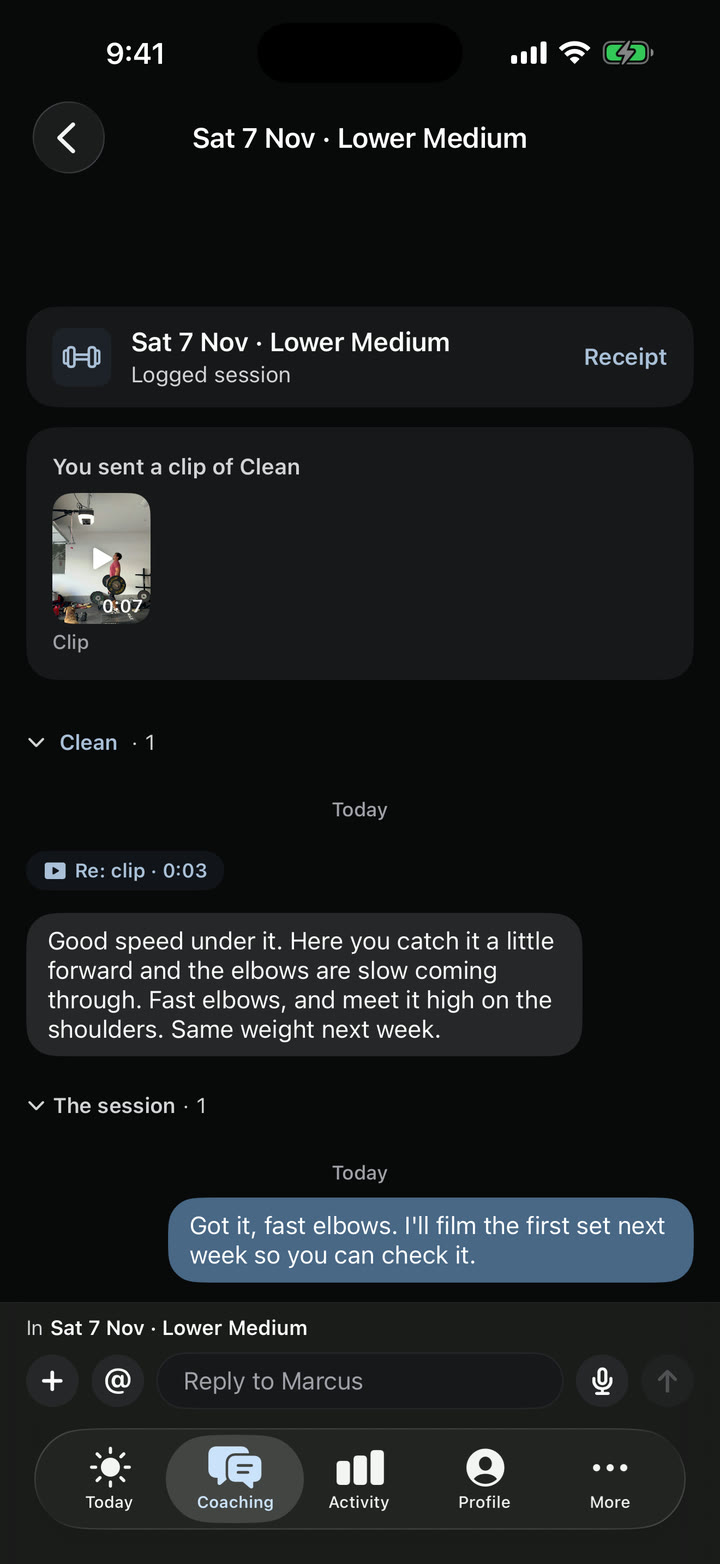
The same thread on Theo's phone: his clip of the Clean, the coach's note tagged Re: clip 0:03, and his answer

Rules that handle it the way you would.

A sore athlete still trains the session you wrote if you're not around to change it. Set a rule for what you'd do. High soreness flags you so you can talk to the athlete, and a second rule can cut a set from the main exercise, like one set of squats. Turn on Apply automatically and the cut goes in before they start, then shows in Review as applied. Leave it off and the change waits in Review for your OK.

A suggestion in Review from the rule Sore legs: one set off, taking one set off each of five lifts for Rowan, with Accept, Decline and Edit

Clients who stay

Clients pay you for their workouts, and for you watching their training and answering their feedback. An AI-generated workout would get most people somewhere. What they want from a coach is to talk to you and get your guidance, and this loop is built around that.

Time back Record your feedback and adjust the client's workout in the same place, without switching apps.

Clients who stay When a reply takes seconds, you can keep up with their sessions and answer their clips, and that attention is what clients pay you for. The app they open carries your logo and brand color.

One place Messages, clips and check-in answers land in Review instead of WhatsApp and iMessage.

See your own program in Gridlines.

Send us your program and we'll build it in Gridlines for you. Apply to start.

Apply to joinGridlines is in early access. Apply, and we'll call you to get set up.

In detail · Workflows

Check-ins

A text asking how everyone slept gets a few replies and a lot of silence. Build the check-in you'd run in person, covering soreness, sleep, injury, motivation and how sore they were last time, and athletes answer it in the app before they train.

The coach's Review on the web, grouped into Urgent, Needs a look and Routine
A readiness check-in with sleep typed in and recovery and HRV filled in from WHOOP
A daily check-in on the athlete's phone.
  • Scales, yes or no, body areas, numbers, short and long answers, choices, dates and signatures
  • Before or after each session, with a reminder
  • Everyone, one team or one athlete
  • Flag an answer when it crosses a line you set
  • Preview before it goes out
  • Send it once, on a date, or right now
  • A daily check-in to start from
Read the docs

In detail · Workflows

Wearables

Athletes skip check-in questions they'd have to look up in another app. If they wear a WHOOP or an Oura, their sleep, HRV, resting heart rate and recovery answers fill in for them. On iPhone, Apple Health can fill in sleep, HRV and resting heart rate too. Your rules read those answers on your own scales.

Sleep filled in from WHOOP, with its source.
  • WHOOP and Oura, plus Apple Health on iPhone
  • Sleep hours, HRV, resting heart rate and recovery
  • Each answer names where it came from, and shows when the athlete changed it
  • The athlete can edit any filled-in answer
Read the docs

In detail · Workflows

After-session forms and the check-in on the phone

A form sent by link gets opened late or not at all. Your check-in opens in the app before the session, with Fill in now or Skip and start, and after-session forms appear when the athlete finishes. If a rule changed the session, the athlete sees your note with it, and their answers build into trends you can act on.

  • Fill in now, or Skip and start
  • Forms before and after the session
  • Intake forms with a typed signature
  • Your note on any adjusted session
Read the docs

In detail · Review

A thread per session

Feedback in a chat app scrolls away under everything else. Each session in Review has its own thread that you and the athlete can both come back to, and the notes you leave on exercises stay attached to it. On the web, pause the clip and pin your reply to that moment.

The coach's note pinned to 0:03 of an athlete's clean, and the athlete's answer below it in the session thread
The same thread on Theo's phone: his clip of the Clean, the coach's note tagged Re: clip 0:03, and his answer
One session's thread, with a reply pinned to 0:03.
  • One thread per session
  • Replies pinned to a moment in the clip, on the web
  • Exercise feedback kept for next time
  • Search Review on the web by athlete, item, message or clip title
Read the docs

In detail · Also in Gridlines

Community

Some teams want a place for news and conversation outside the group chat. Each organization and team can have a community in the app, where staff and athletes post, comment and run polls.

The coach's announcement for the Northside Open, with likes and replies
A team community with a coach's poll on Saturday's session time and its votes
  • Posts, comments and polls
  • Moderators pin posts and review reports
  • In the athlete app under More
Read the docs

In detail · Workflows

Rules

A sore athlete still trains the session you wrote if you're not around to change it. Set a rule for what you'd do. High soreness flags you so you can talk to the athlete, and a second rule can cut a set from the main exercise, like one set of squats, before they start.

Two rules on one check-in, one that flags you and one that cuts a set.
  • Today's session, tomorrow's or the rest of the week
  • Compare an answer with a number or with the athlete's 28-day usual, or check whether it was flagged
  • Up to eight steps, applied in order
  • A note to the athlete
  • Apply it on its own, or wait in Review for your OK
  • One rule can sit on several forms
Read the docs

In detail · Workflows

Test a rule

Before a rule goes live, run it against the last 28 days of check-ins to see which athletes and days it would have changed. Nothing is saved.

  • The last 28 days, or up to 56
  • Which athletes, which days, and what would have changed
Read the docs