Review
AI proposals
A proposal is a change to an athlete's session that waits for you in Review. Your training rules propose changes from an athlete's form answers, and the Agent proposes changes when you ask it to. The session stays as written until you accept the change.
 Suggestion
What it is
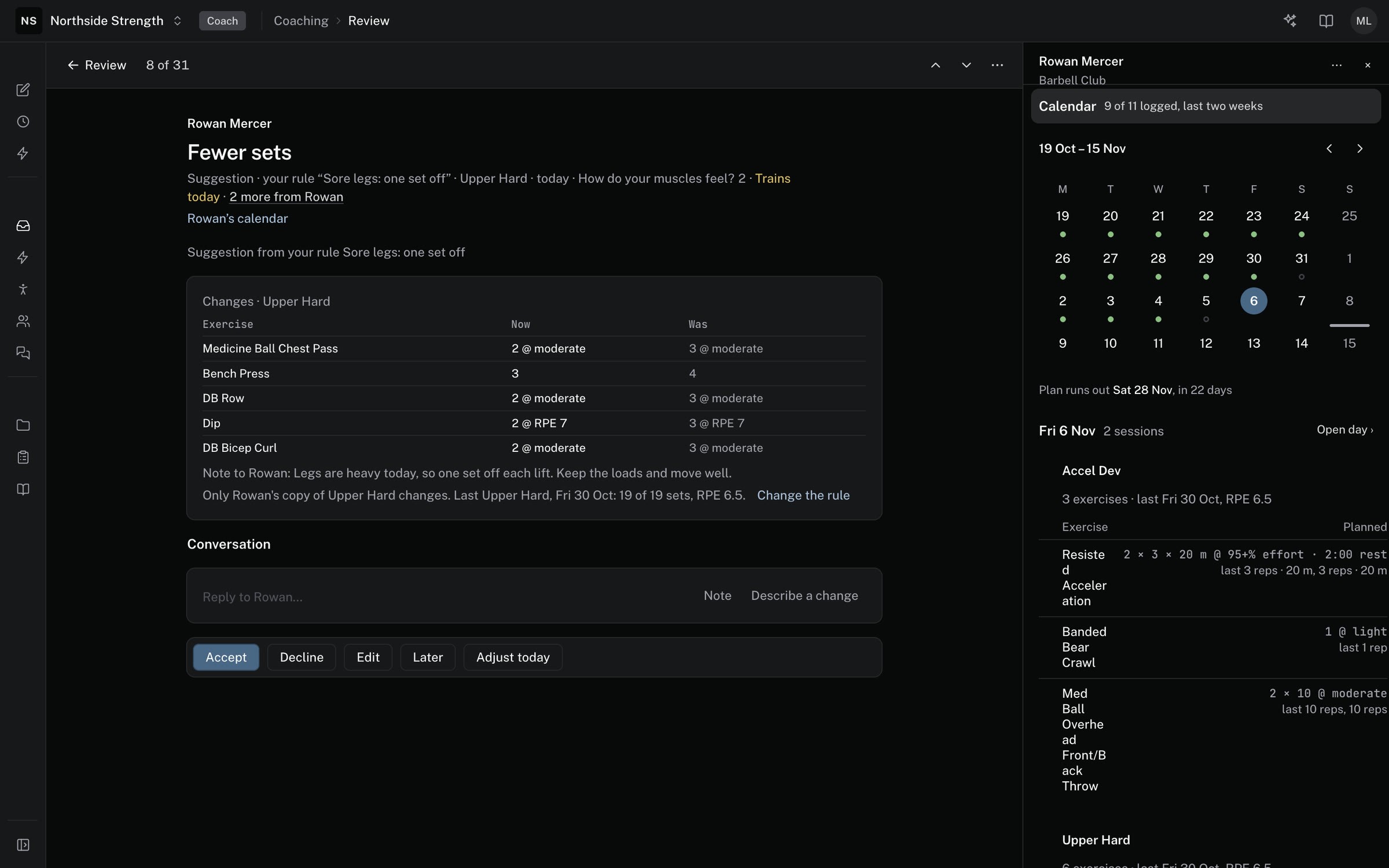
Review calls a proposal a Suggestion. Each one names the session it changes and why. A suggestion comes from one of two places:
- A training rule — a rule on a form turns an athlete's answers into a change, such as fewer sets after a short night's sleep. See set up intake, check-ins, and training rules.
- The Agent — when you ask it, from Describe a change in a thread or in a chat. The Agent never proposes a change you didn't ask for.
AI is part of the paid Gridlines plan. On Free there are no AI features, so the Agent can't propose changes there.
Where to find it
A suggestion arrives in COACHING > Review as its own row. Several for one athlete's day group into one row, such as "3 suggestions". A suggestion about a session or a check-in shows inside that thread too, under what the athlete sent.
To see only suggestions, add the Reason filter and pick Suggestion or Check-in suggestion.
The parts
What a suggestion shows
A suggestion's row gives the change in a few words and the reason for it. For a rule, the reason is the rule's name and the answer that fired it. For the Agent, it is the words you asked with. Open the row to see the Changes table. Each line shows the new value under Now and the old value under Was.
Accept, Decline, or Edit
- Accept — applies the change to the athlete's calendar. Review confirms that the athlete's calendar is changed. A Note only suggestion sends its note to the athlete instead.
- Decline — leaves the session as written.
- Edit — opens the day in the builder with the suggested row picked. When you change the day there, the suggestion reads Accepted (edited).
With several open suggestions, the buttons read Accept 3 and Decline 3, or the count you have. You can also accept or decline each row on its own.
Undo and Revert
An accepted suggestion shows Undo. A rule's change shows Revert, which puts the session back as it was. When someone edits the day after you accepted, Undo can't run. The row then offers Fix it by hand, which opens the day.
Applied automatically
A rule with Apply automatically on makes its change without waiting. The row in Review reads Applied automatically with the rule's name, and offers Revert.
Describe a change
In an open thread, the reply box has a Describe a change tab. Write what should change for the athlete, then click Propose. The Agent turns your words into suggestions on the thread, which you accept or decline like any other. If the thread's day has passed, Review offers to start from the next session instead.
Limits
- A suggestion for a day that is already past can't be accepted. Decline it, or change a later day by hand.
- When the Agent doesn't answer in time, nothing changes, and the thread says so.
Common questions
Will a rule change a session without me?
Only when you turn on Apply automatically for that rule. Otherwise the change waits in Review for you.
Why is Accept missing on a suggestion?
The suggestion's day is before today, so it can't be accepted. Decline it, then change the athlete's next session by hand if it still needs it.
Can I ask the Agent for a change outside Review?
Yes. In a chat with the Agent, ask it to suggest a change for an athlete. The suggestion lands in Review for you to accept.
Related
Stuck? Message us directly.