The Agent
The Agent is a chat that works on your organization's data. Ask it who trained this week, or to add a deload week to a program, and it reads and writes the same programs, calendars, and library you edit by hand. Every write it can make is one you could make yourself.
Where to find it
- The Agent page — in the sidebar's AGENT group, click New chat. Coaches land here when they sign in.
- The Agent panel — click the sparkles button in the topbar. The panel opens as a column on the right of any page. It carries the same conversation as the Agent page, so you can move between pages mid-chat.
- Ask Agent — a button on athlete, team, and program pages, and on Today. It opens the panel with a message started about that page.
Chats waiting for your answer list under Waiting for you in the AGENT group. The sparkles button shows a dot when a chat is waiting.
Writing a message
- @ mentions — type
@to reference an athlete or a program by name. - Attachments — attach images, PDFs, or spreadsheets. Attach an old program file and ask the Agent to convert it into a program.
- Dictation — click the microphone to speak a message.
- Skills — the Skills menu runs a saved procedure. See skills.
Ask and Agent modes
The mode menu on the composer picks the job:
- Ask — reads only. It asks for no confirmations and costs fewer credits.
- Agent — reads and writes. It asks before a change.
Approving changes
In Agent mode, the approval control on the composer reads Ask first or Auto-apply:
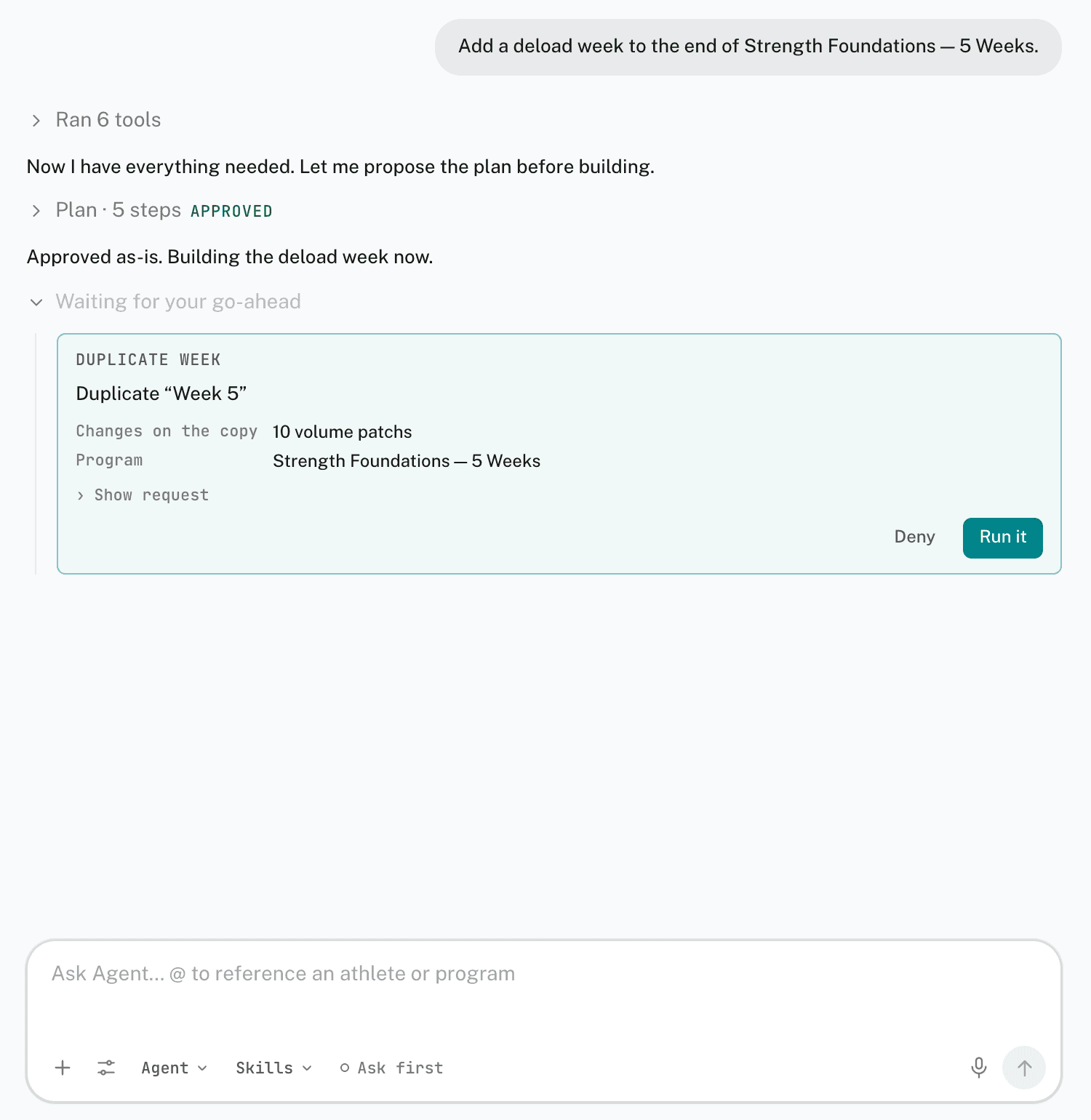
- Ask first — every edit appears as an approval card. The card names the change and lists its details. Click Run it to apply it, or Deny. Show request shows the raw request.
- Auto-apply — edits run without a card. Removals still ask.
A card that deletes data is marked Deletes data, and its button reads Remove it.
For a larger job, the Agent proposes a plan first. Click Approve plan, Edit the steps, Skip planning, or Decline with a note. While the plan runs, Up next shows the remaining steps.
When the Agent needs a detail from you, it shows an Agent asks card. Choose an answer, or type your own.
In the composer's settings, Create exercises without asking lets new library exercises skip the card while Ask first is on.
Chats and history
- History — lists past chats. Click the search icon, or press Cmd+K, to search them.
- Pin as panel — on the Agent page, opens the conversation in the panel and returns you to the page you came from.
- Remember — on a reply, saves a rule from it to your coaching eye.
- Copy reply — copies a reply's text.
Every chat has a limit to what the model can read at once. From 75% full, a Chat N% full pill appears, and the composer offers Summarize for a new chat. A full chat replaces the composer with New chat. The transcript stays readable.
Credits and plans
The composer shows the credits left in your organization's monthly pool. AI is included on every paid organization plan. A new organization gets an AI trial. The pill beside the title shows the days left.
In the desktop app
The desktop app has its own AI panel in the right dock. Press Cmd+? to open it. It works on the program open in the editor.
Related
- Scheduled tasks
- Skills
- Coaching eye
- Connect your AI assistant — use Claude or another MCP-compatible assistant instead.