Importing exercises from CSV
Import a spreadsheet to add many exercises at once. You review every row before anything saves, so a typo doesn't reach the library.
You need a CSV, TSV, or XLSX file with a header row and up to 1,000 rows. Download the exercise template to start from the right columns.
The columns
| Column | Required | What it takes |
|---|---|---|
name | Yes | Up to 100 characters. |
type | No | One of the system exercise types, or blank. |
tags | No | Separate several tags with a semicolon. |
description | No | How the movement is performed. |
notes | No | Coaching notes. |
video_link | No | Must start with http:// or https://. |
Importing
- Open the import dialog
In the sidebar, open Library. On Exercises, click Import CSV.
- Choose the file
Drop the file on the dialog, or click Choose file. The dialog lists the columns it reads. Download template gives you a sample file.
- Review the rows
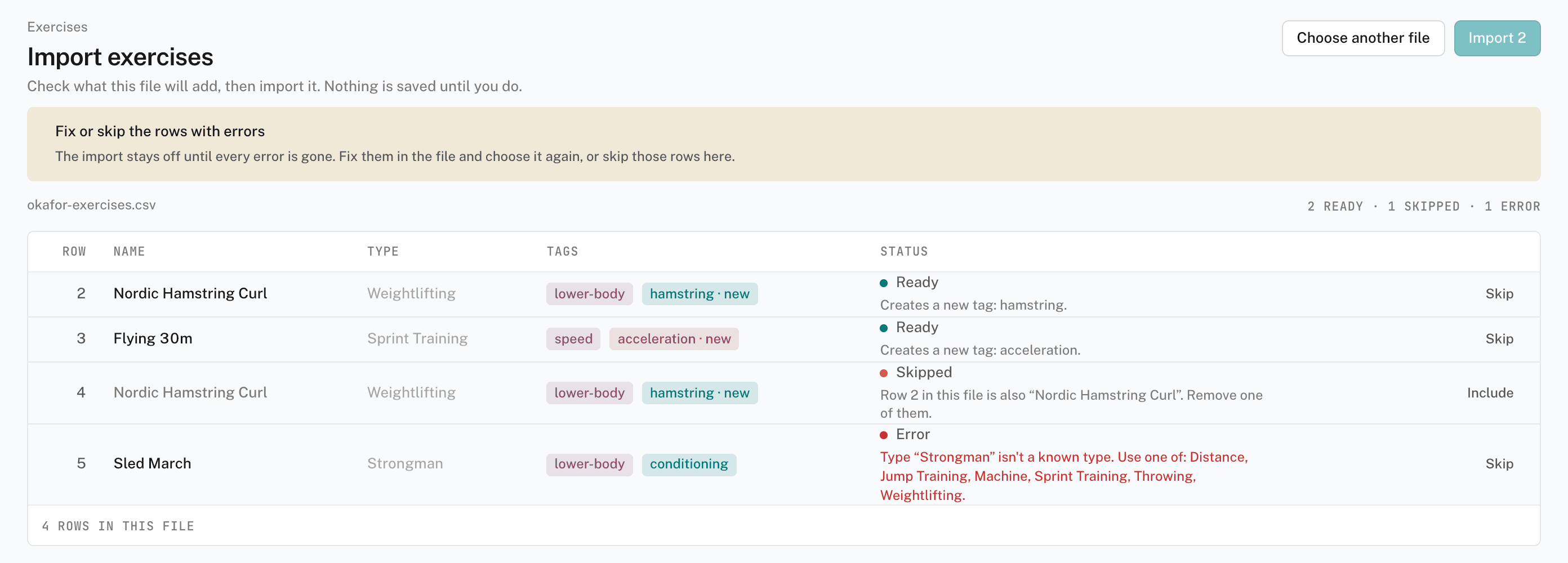
The review page shows every row with a status: Ready, Skipped, or Error. Fix or skip the rows with errors. Click Skip or Include to change a row.
- Import
Click Import with the count of ready rows. The results page shows Imported or Not imported for each row. Click Done to go back to the library.
How rows are checked
- An unknown tag — the import creates it.
- An unknown type — the row is an error. Types are fixed, so an unknown type is treated as a typo.
- A name already in your library — the row is skipped by default. Click Import anyway to add it as a second exercise. The library doesn't enforce unique names, so a skipped row prevents a silent duplicate.
The import runs its checks again when you click Import. A row can still fail if the library changed after you opened the review page.