Finding and buying programs
You buy programs on the web, and you train them in the mobile app. A coach shares a link to one program, or to their storefront. You pay on the web with Stripe. The program then appears in the app under Profile > Programs.
Where programs come from
The app has no catalog to browse. A program reaches you in one of these ways:
- A program link — a coach shares a link to one program's page.
- A coach's storefront — the coach's public page, with their bio and the programs they sell.
- Your coach — a coach who invited you puts programs on your team or organization calendar. You pay nothing for these, because the organization's plan covers you.
What a program page shows
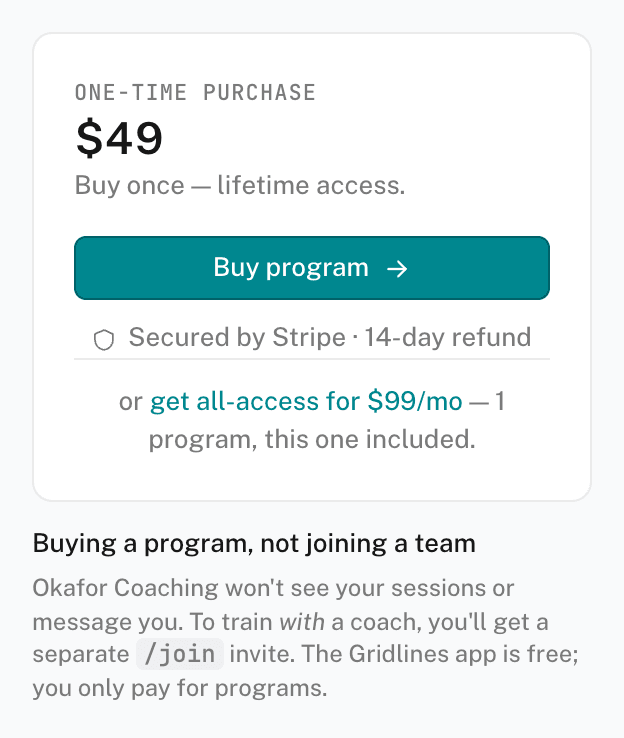
The web page for a program shows the program, the coach, and the price. Each program is one of two kinds:
- One-time — you pay once and keep access. Nothing renews.
- Ongoing — billed monthly while you stay subscribed. New weeks arrive on the coach's schedule. Some ongoing programs start with a free trial, and the page shows it.
A coach's storefront can also offer all-access. All-access is one monthly subscription that covers every program the coach includes in it.
Buying a program
- Open the program on the web
Open the coach's link. If the app opens instead, tap Get this program or Subscribe. The app shows Available on the web. Tap Open getgridlines.com to continue in your browser. Outside the United States, the app has no button, so open the link in your browser.
- Sign in or create an account
Use the same email you use in the app. The page brings you back to the program after you sign in.
- Pay with Stripe
Click Buy program, Subscribe, or Start free trial. Stripe Checkout takes the payment. Card details go to Stripe, not to the coach.
- Start it in the app
In the app, open Profile > Programs. Pull down to refresh if the program is not there yet. It waits under READY TO START, or under AVAILABLE TO START if something is already on your calendar. Tap Start.
What cancelling means
Cancelling an ongoing program stops future charges. You keep access through the period you paid for. Your logged sessions stay in Activity, and ending a subscription never deletes your history. See Managing your billing.
A program you bought is yours as a customer. It does not put you on the coach's team. See Buying a program for the difference.