Today
Today lists the athletes you coach, sorted by who needs attention first. It reads each athlete's readiness score and check-in, and shows the proposals your readiness rules made for today's sessions. In your web dashboard, open Coaching > Today.
Admins see every athlete in the organization. Coaches see the athletes on their own teams.
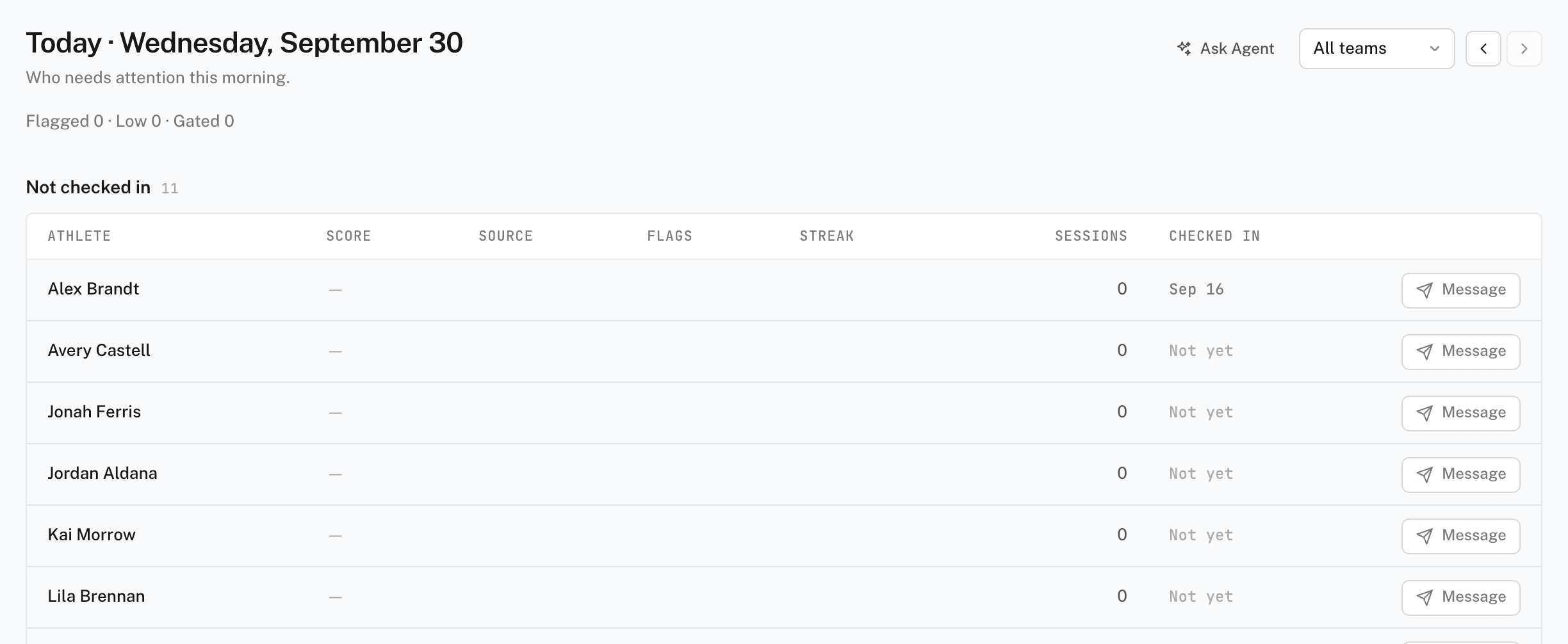
How the page is ordered
Each athlete appears once, in the first section that matches them:
- Flagged — a check-in answer crossed that question's flag threshold.
- Low — the readiness score is 0 to 33.
- Gated — the readiness form gates sessions, the athlete has a session today, and no check-in arrived yet.
- Not checked in — no check-in yet today.
- Ready — everyone else.
Empty sections collapse into one summary line, such as "Flagged 0 · Low 0".
Each table has the same columns: Athlete, Score, Source, Flags, Streak, Sessions, and Checked in.
- Score — the readiness score and its band: Ready (67–100), Moderate (34–66), or Low (0–33). An arrow compares it with the athlete's usual score. Pending means there is no score yet.
- Source — where the score came from: WHOOP, Oura, Apple Health, or Check-in.
- Checked in — the check-in time, or Not yet.
Click an athlete's name to open the athlete page. Click Message on a row to open a thread with that athlete.
Alerts
The Alerts strip sits above the tables when there is something to show. Each alert has a kind: Flag, Streak, Gated, or Intake. Click Acknowledge to clear an alert after you deal with it.
Proposals
Readiness rules can propose a change to an athlete's session, for example a lighter day after a low score. Each open proposal has two actions:
- Approve — applies the change to today's session. An applied proposal shows Undo.
- Dismiss — leaves the session as written.
A row with a proposal shows a pill with the count. Click it to jump to the Proposals section. Rules are set on the team page, under Automation > Readiness rules. See team forms and readiness rules.
Filters and yesterday
- Filter by team — shows one team's athletes. All teams is the default. The filter appears only when you coach at least one team.
- Yesterday — the day stepper in the header switches to yesterday's board. Only today and yesterday are available.
If the page is empty
"No athletes on your teams yet" means nobody is on a team you coach. Invite athletes, or ask an admin to add you to a team. See inviting athletes.