Workflows
How the feedback loop works
Gridlines hears from your athletes around each session and puts what matters in front of you. A check-in before the session can change it through your rules. The session and a short form after it tell you how it went. Review collects the answers, sessions, and clips that need you.
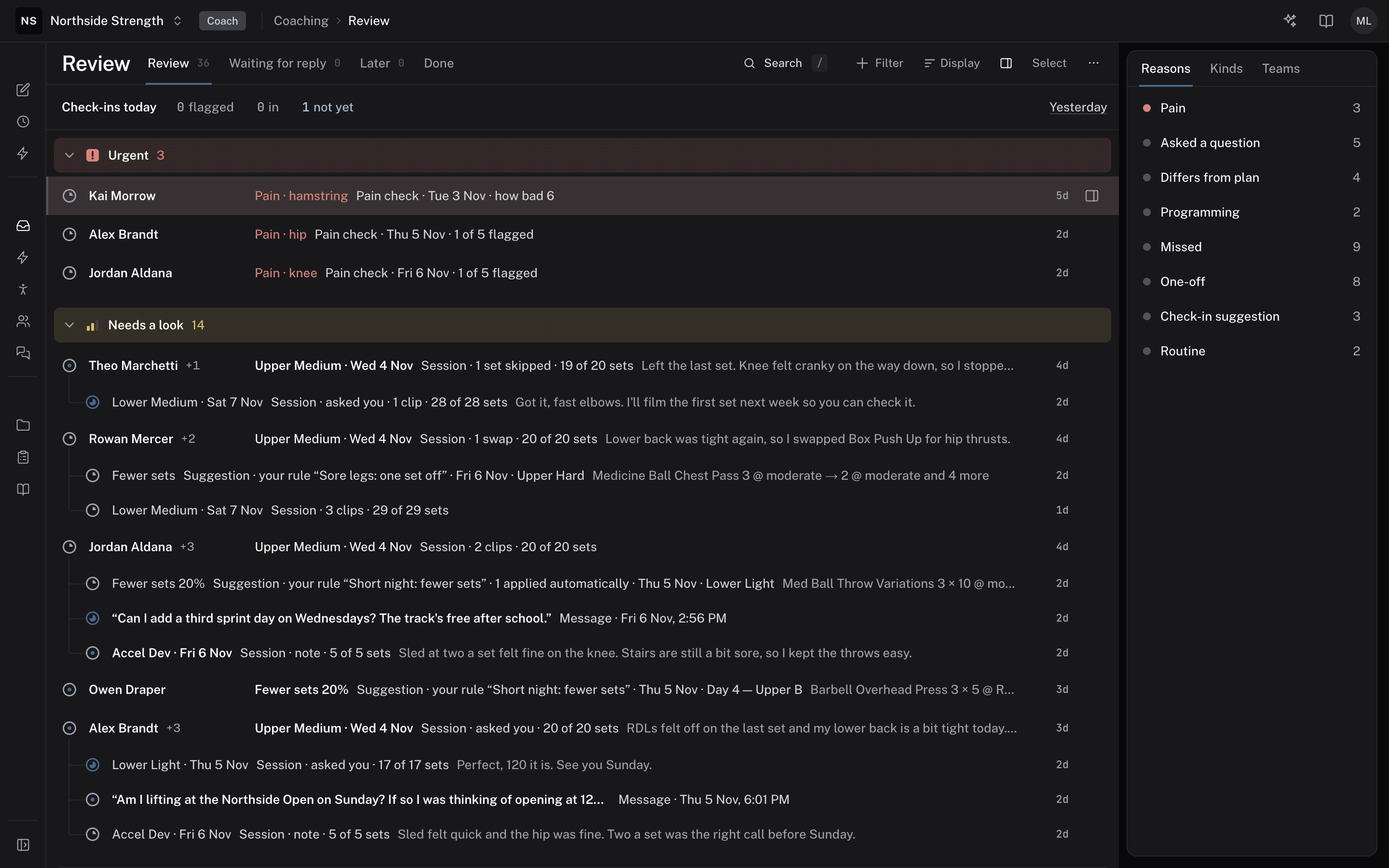
 Review
What it is
The loop has five steps for each athlete and each session:
- The check-in — the athlete answers a short form before the session.
- Your rules — rules read the answers and change today's or tomorrow's session.
- The session — the athlete trains it and logs each set.
- After the session — the athlete rates the effort, adds a note, and answers any form you send after sessions.
- Review — the answers, changes, and sessions that need you arrive in one list.
Where to find it
You build the forms in BUILD > Forms, set when they go out and write rules in COACHING > Automation, and work the results in COACHING > Review.
The parts
The check-in
A check-in is a form that goes out before or after sessions, or on set days. A new organization starts with a Daily check-in for everyone before each session. It asks about sleep hours, soreness, energy, pain, and illness. The athlete answers in the app when they tap Start, or skips it. A connected WHOOP, Oura, or Apple Health can fill in a number. See build a check-in and wearables in check-ins.
Flags
An answer that crosses a line you set, a Yes to pain or illness, or an answer clearly worse than the athlete's usual is flagged. A flagged answer opens a thread in Review. See flags and the athlete's usual.
Your rules
A rule reads the answers and changes a session, such as easing loads after a short night. Its change waits for you in Review, or applies on its own and shows there as applied. Rules stop at Start, so a session never changes while the athlete is training it. See auto-adjust from the daily check-in and test a rule.
The session
The athlete trains the session as it now stands and logs what they did. See what your athletes see.
After the session
When the athlete taps Finish, the app asks for their session effort, a note, and any clips. A form you send after each session opens on the same screen. See after every session.
Review
Review is the list of athletes and conversations that need you. A logged session becomes a thread only when it has something to look at, such as a note, a clip, or a skipped set. A form opens a thread only when an answer is flagged. See Review, start here.
Limits
- Gridlines switches Review on for each organization. Without it, Review in the sidebar opens Today, the morning board of your athletes' check-ins.
- A rule changes only today's or tomorrow's session.
Related
Stuck? Message us directly.